Bank Reconciliation Template
Paste in the bank statement and the cash book. It matches the lines, lists what is outstanding and builds the bank reconciliation statement.
US$9.00
one-off payment
Tell me when it is on saleCheckout is not open yet, so you cannot buy today. The button writes an email; I will reply when the template is on sale.
Who it is for
A good fit
- Cashiers and accountants who prepare a bank reconciliation by hand every month
- One bank account with up to 2,000 statement lines and 2,000 cash book lines a month
- Desktop Excel
Not a fit
- More than 2,000 lines a month on one account
- Several bank accounts combined on one sheet (one file reconciles one account; save a copy per account)
- Google Sheets, Numbers or phone-only use (not tested)
Three steps
| Fill in Setup | On the Setup sheet enter the company, account, reconciliation date and the two closing balances: bank statement and cash book. |
|---|---|
| Paste the lines | Paste this month's statement into Bank and this month's bank account entries from your books into Books. Items still open from last month go into Brought Forward. |
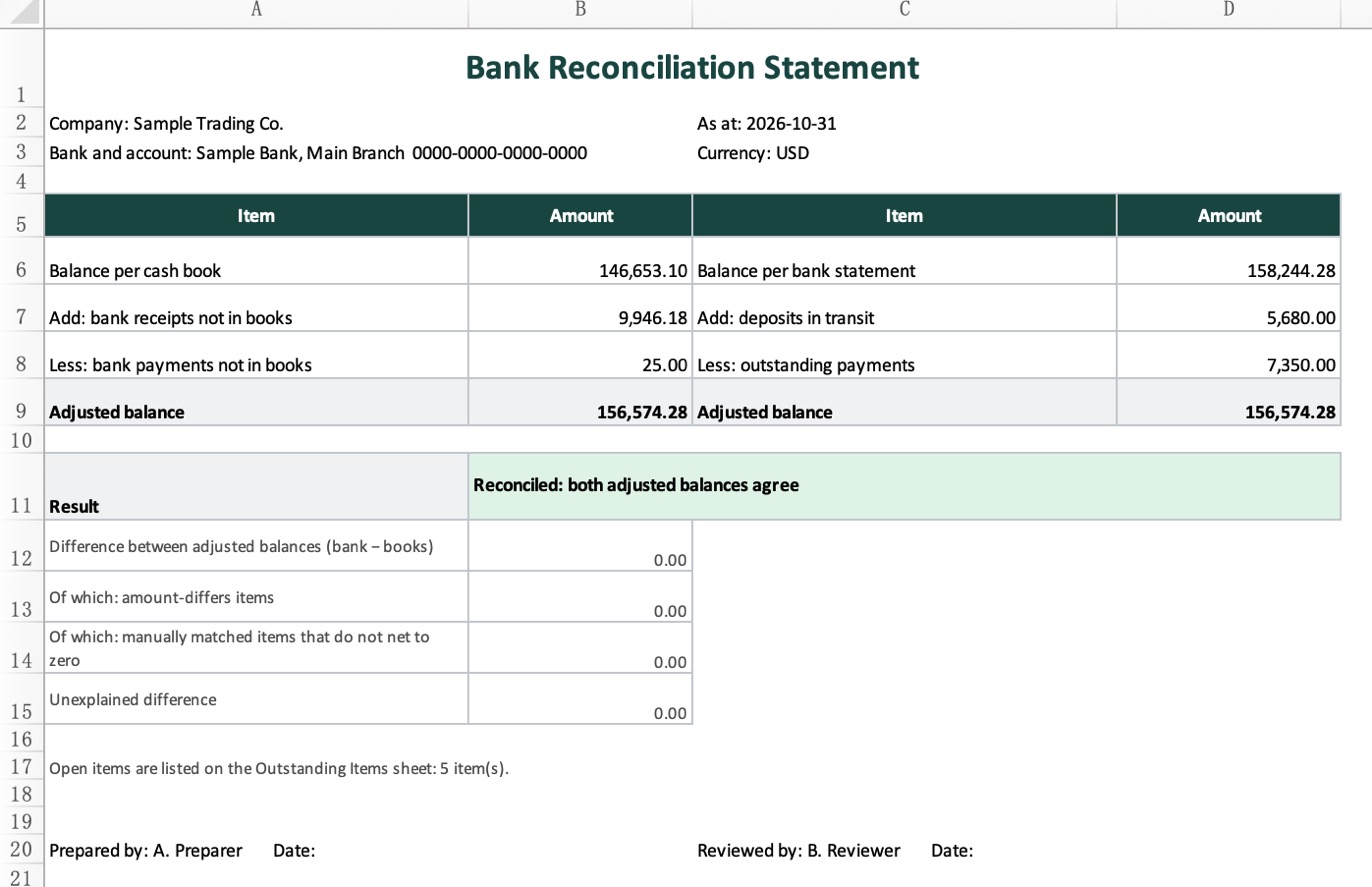
| Read the result | Open the Reconciliation sheet. Reconciled means you can print, sign and file it. If it is not reconciled, the sheet shows how much of the difference comes from amount-differs items, how much from manual matches, and how much is unexplained. |
What is in the file
| Guide | The three steps, what each status means, what to do when the automatic result is wrong, and how to roll into next month. |
|---|---|
| Setup | Fill this in first each month. Opening balances are optional and add one check: whether all lines were pasted. |
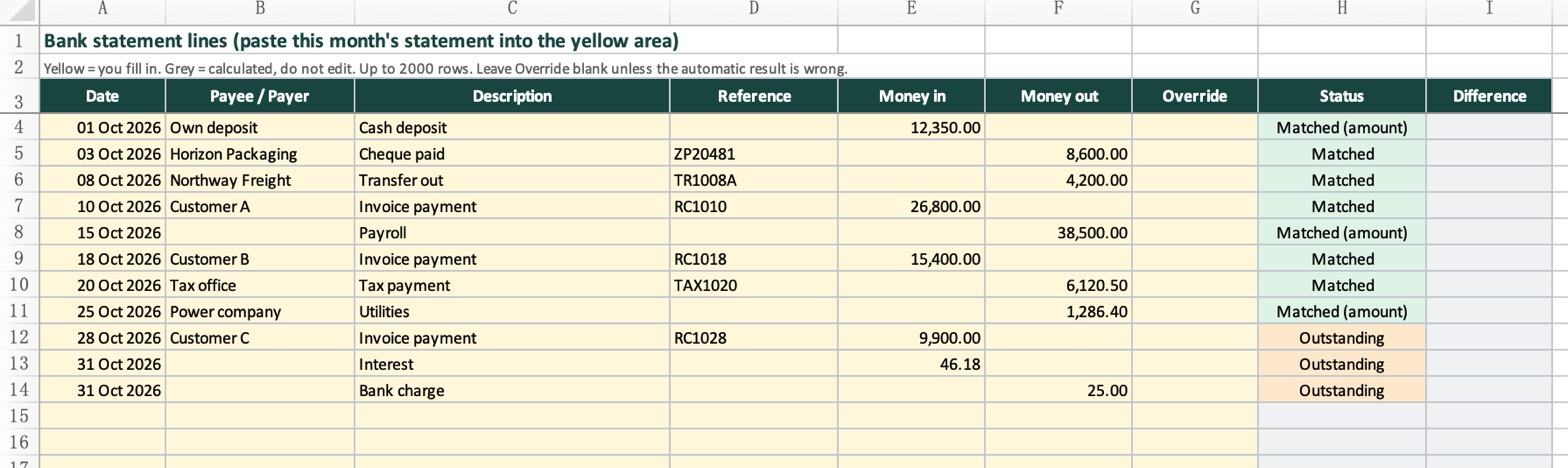
| Bank | Paste the bank statement lines, up to 2,000. Each line gets a status and a difference. |
| Books | Paste the cash book lines, up to 2,000. Each line gets a status and a difference. |
| Brought Forward | Paste items still open from last month, up to 300. They keep taking part in matching. |
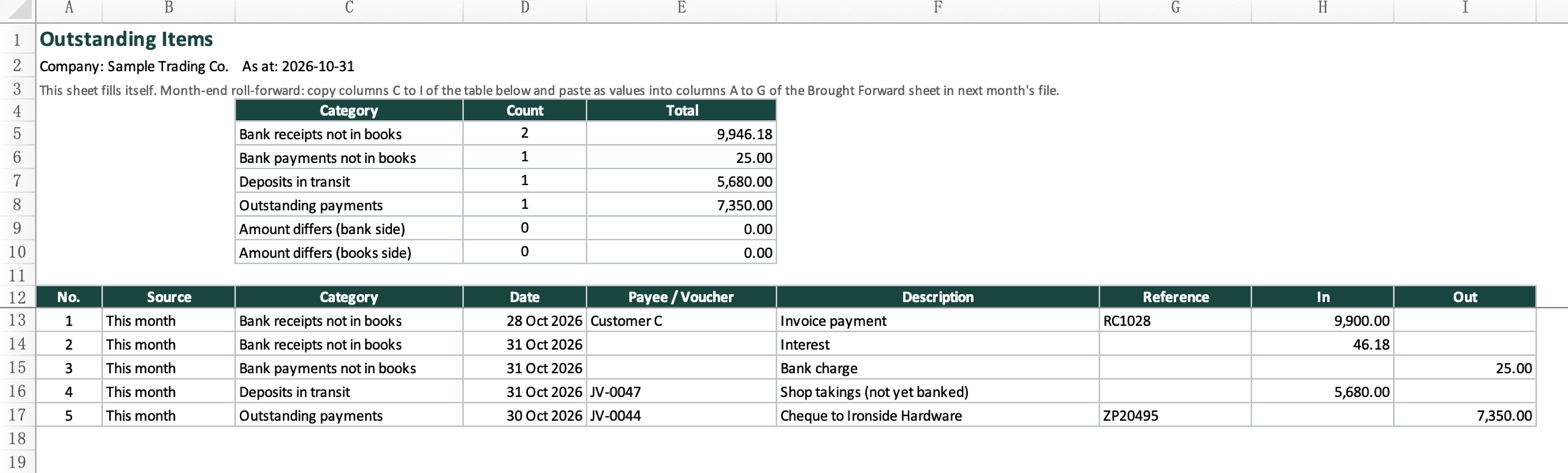
| Outstanding Items | Fills itself. Lists every outstanding and amount-differs item by category, up to 500 items. |
| Reconciliation | Fills itself. Adjusted balances on both sides, the difference, the result, and Prepared by / Reviewed by lines. |
There is also one hidden sheet that holds the working formulas. The file ships with made-up sample data so you can see it work; clear it before you start.
How it matches
- By reference first: the same reference on both sides with equal totals is Matched. The same reference with different totals is flagged Amount differs.
- Then by amount: where there is no usable reference, lines for the same amount are paired. When an amount appears several times, lines are paired in order.
- You can override: when the automatic result is wrong, choose Matched or Outstanding in the Override column.
- A line on one side only is a reconciling item. There are four kinds on the statement: bank receipts not in books, bank payments not in books, deposits in transit and outstanding payments.
- Everything is an Excel formula. No macros, no internet connection.
What it looks like
The template open in Excel. The company, payees and amounts are made-up sample data.
Read this before you buy
- Tested in Excel for Mac. It uses only long-standing functions, none that need a recent Excel; Excel for Windows has not been tested version by version.
- Limits: 2,000 lines each for Bank and Books, 300 for Brought Forward, and the list shows up to 500 items (the totals on the Reconciliation sheet stay complete beyond that).
- Google Sheets, Numbers and other spreadsheet apps have not been tested and are not promised to work.
- Your data stays on your computer. The file has no macros and makes no connection; I never see what you enter.
- This is a calculation tool. It is not accounting or audit advice. Review the result before you sign it.
Questions
- How do I get the file?
- Checkout is not open yet. When it is, you pay on a third-party checkout page and download the .xlsx file there. This site takes no payment and hosts no file.
- Can I change it?
- Yes. Fill the yellow areas as you like. The Reconciliation and Outstanding Items sheets are protected without a password; use Review → Unprotect Sheet to change the layout. Do not edit the grey formula columns or delete whole rows.
- How many people can use it?
- One purchase is for you personally, for any number of accounts and months: save a copy per account and per month. Colleagues should buy their own copy; please do not resell or share the file publicly.
- Can I get a refund?
- Yes. If the file does not open or a formula gives a wrong result, email hello@auditablecode.com within 7 days for a full refund.
- Can I get a tax invoice?
- The checkout platform emails you a receipt for each order. I sell as an individual and cannot issue a separate tax invoice in my own name.
- Who do I ask?
- Email hello@auditablecode.com.
Buy
US$9.00
one-off payment
Tell me when it is on saleCheckout is not open yet, so you cannot buy today. The button writes an email; I will reply when the template is on sale.